
Spreadsheet software - List of Manufacturers, Suppliers, Companies and Products | IPROS

Spreadsheet software Product List

1~3 item / All 3 items

Displayed results

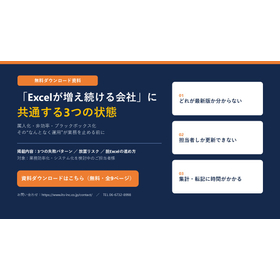
"A company where Excel continues to grow" continues to expand without being standardized.

Are you unknowingly carrying inefficiencies in exchange for "convenience"?

One common failure pattern in companies where Excel continues to grow is the ongoing expansion without establishing rules. By continuously adding to files, they become numerous and uncontrollable. While Excel is convenient and easy to use, continuing to use it without management rules can easily become a bottleneck in operations. The first step is to organize the current situation and visualize "where the waste and risks are." 【Do you have any of the following issues?】 ■ Multiple similar files exist, and the latest version is unclear ■ Only specific personnel can perform update tasks ■ Data aggregation and transcription take a long time ■ Input errors and formula breakdowns occur frequently ■ Storage locations and naming rules are inconsistent ■ Operations come to a halt when the responsible person is absent *For more details, please download the PDF or feel free to contact us.

  • others
  • Spreadsheet software

Added to bookmarks

Bookmarks list

Bookmark has been removed

Bookmarks list

You can't add any more bookmarks

By registering as a member, you can increase the number of bookmarks you can save and organize them with labels.

Free membership registration

Customer management can be done with Excel! Introducing how to create it and free templates.

A detailed column explaining the methods, benefits, and precautions of customer management!

As customer needs become more diverse, companies need to appropriately manage customer information to understand and respond to individual needs. If there is no budget to introduce a new system for customer management, using Excel is recommended. It is free to use and is commonly used for internal administrative tasks, making it sufficient for basic customer management. This article will provide a detailed explanation of methods, benefits, and points to note regarding customer management using Excel. We also introduce Excel templates to help you get started with customer management, so please give it a try. *For more details on the column, you can view it through the related links. If you have any questions, feel free to contact us.*

  • CRM (Customer Relationship Management System)
  • SFA (Sales Support System)
  • Spreadsheet software

Added to bookmarks

Bookmarks list

Bookmark has been removed

Bookmarks list

You can't add any more bookmarks

By registering as a member, you can increase the number of bookmarks you can save and organize them with labels.

Free membership registration

Convert Google Sheets to PDF! How to convert, share, and paste.

Let's focus on tools that cover the weak areas of spreadsheet software and unlimited cloud storage to streamline information sharing and management.

Google Sheets is a free spreadsheet software that excels in sharing and collaborative editing features. It is user-friendly in a telework environment, and many companies are likely transitioning from Excel to Google Sheets. One of the advantages of Google Sheets is its ease of handling PDF files, but some may not know how to convert Google Sheets files to PDF. Knowing not only the conversion process but also how to share and paste can help you utilize Google Sheets more effectively. In this article, we will introduce the method for converting Google Sheets to PDF, as well as how to share and paste. *For more detailed information, you can view the related links. For further details, please download the PDF or feel free to contact us.*

  • Document Management System
  • Spreadsheet software

Added to bookmarks

Bookmarks list

Bookmark has been removed

Bookmarks list

You can't add any more bookmarks

By registering as a member, you can increase the number of bookmarks you can save and organize them with labels.

Free membership registration